Argantara: A Bold Sans Serif for Web Design
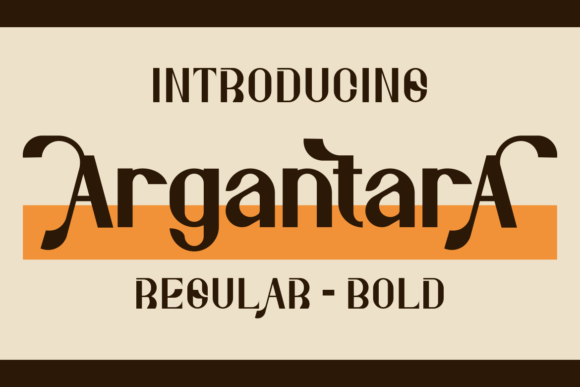
As a web designer, I’m always on the lookout for fonts that bring energy and clarity to digital projects. Argantara has quickly become one of my go-to choices for headers, hero sections, and branding elements. Its bold, authentic sans serif style adds a modern edge without sacrificing readability, making it perfect for a wide range of web design needs.
Testing Argantara in a Hero Section
I recently tested Argantara on a new landing page for a boutique online store. The font’s clean lines and strong presence made it ideal for the main headline. It stood out against a background image without overpowering it, creating a visual balance that felt both professional and inviting. The weight and spacing worked well on mobile screens, ensuring the message remained clear even at smaller sizes.
One thing I appreciated was how Argantara handled different color contrasts. Whether paired with a dark background or a light one, the font maintained its legibility and visual impact. This versatility makes it a great choice for websites that need to adapt to various themes or user preferences.
Using Argantara for Call-to-Action Buttons
Call-to-action buttons are crucial for guiding users through a website. When I used Argantara for a CTA button on a product landing page, it added a sense of urgency and confidence. The font’s boldness helped the button stand out without being too flashy, which is key for maintaining a polished look while still driving engagement.
I also experimented with different button styles, from solid colors to outlined versions. In each case, Argantara retained its sharpness and character, proving it’s a reliable choice for interactive elements. The font’s subtle curves gave it a friendly yet authoritative feel, which aligns well with many brand identities.
Argantara in Responsive Layouts
Responsive design is a must for any modern website, and Argantara performed well across different screen sizes. On desktop, it delivered a crisp, confident look that complemented the site’s overall aesthetic. On mobile, the font scaled smoothly without losing its definition, ensuring that headlines and labels remained easy to read.
One challenge I faced was using Argantara on small buttons. While it looked good on larger CTAs, it became slightly cramped on tiny touch targets. That’s why I recommend using it for larger text elements rather than navigation menus or form labels where space is limited.
Pairing Argantara with Other Fonts
Font pairing can make or break a website’s design. I found that Argantara pairs exceptionally well with simpler sans serif fonts for body text. For example, when combined with a clean, neutral typeface like Open Sans, it created a balanced hierarchy that felt both modern and approachable.
For more editorial-style sites, I experimented with pairing Argantara with a soft serif font. The contrast between the two added depth and visual interest without clashing. This combination worked especially well for blog headers and section titles, offering a refined yet dynamic look.
Considerations for Web Use
While Argantara is excellent for display purposes, it’s not ideal for long paragraphs of body text. The font’s boldness and slight ornamentation can make extended reading less comfortable, especially on smaller screens. That said, it shines when used as a focal point—whether in headlines, subheadings, or decorative accents.
Before integrating Argantara into a project, I always check for webfont availability and licensing. It’s important to ensure that the font works seamlessly across different browsers and devices. I also recommend testing it on a variety of backgrounds and text colors to see how it performs in different contexts.
Overall, Argantara is a powerful tool for web designers looking to add a modern, impactful look to their projects. Its bold, authentic style brings a sense of confidence and creativity to any digital space, making it a valuable addition to any design toolkit.